
Two options, compared
| Claude’s Google Calendar connector | Needt via MCP | |
|---|---|---|
| Made by | Google / Anthropic (built in) | Needt (custom connector) |
| Calendars | Google Calendar | Whatever you connected in Needt: Google, Outlook/Microsoft 365, iCloud, CalDAV |
| Events | View, create, update, delete, RSVP, find mutual availability | List and manage events in your connected calendars |
| Tasks with estimates | No | Create, list, update, complete |
| Auto-scheduling | No | Run the scheduler, reschedule |
| Best for | Meetings: invites, availability, RSVPs | Work: fitting tasks around meetings |
Capabilities of Claude’s connector are taken from Anthropic’s help article Use Google Workspace connectors; by default Claude asks for your approval before each action. Features change, so check that page for your plan.
Option 1: Claude’s Google Calendar connector
- Open Claude on the web or in Claude Desktop and go to Customize → Connectors.
- Find Google Calendar and click Connect. Sign in with the Google account whose calendar you want. On Team and Enterprise plans an Owner may need to enable it first.
- Turn it on in a chat from the connectors menu under the message box if it isn’t on already.
- Ask something concrete: “What meetings do I have tomorrow, and where’s my longest free gap?”
This is the right tool for meeting logistics. It doesn’t know your to-do list, so “plan my week” only gets you a view of your meetings.
Option 2: Needt via MCP
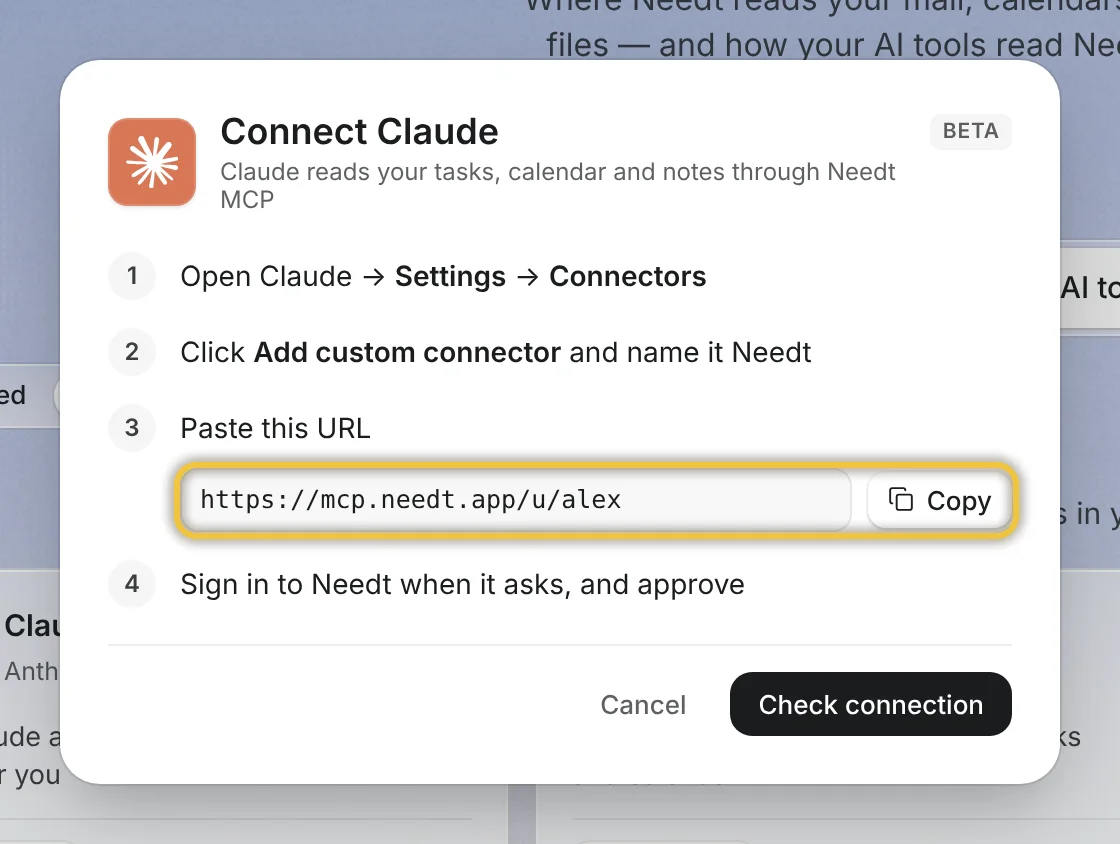
MCP (Model Context Protocol) is the open standard Claude uses for connectors. Needt runs a remote MCP server at https://mcp.needt.app/u/your-name. Background and safety rules are in Your AI assistant can now see your calendar; here are the steps.
In Claude (web or desktop)
- Have a Needt account with your calendar connected. Sign up at use.needt.app; new accounts get 14 days of Pro after email confirmation.
- In Claude, open Customize → Connectors, click + then Add custom connector (Anthropic’s steps). Free Claude plans can add one custom connector.
- Name it Needt and paste
https://mcp.needt.app/u/your-nameas the URL. Click Add. - Click Connect and sign in to Needt (OAuth). Approve access.
- Enable it in a chat and try: “What’s on my plate today in Needt?”
In Claude Code
Add it as a remote HTTP server: claude mcp add --transport http needt https://mcp.needt.app/u/your-name, then authenticate when prompted. If your setup can’t do OAuth, create a personal token in Needt under Settings → Data → Personal API and pass it as a bearer header (see Claude Code MCP docs). Full details on Needt MCP docs.
Worked example: Alex’s Tuesday
Monday evening, Alex opens Claude with both connectors on and types:
Look at tomorrow. I have the client call at 10:00. Add three Needt tasks: logo revisions 60 min #Clients due tomorrow, invoices 20 min #Home, homepage copy 90 min #Website due Thursday. Then schedule them around my meetings, nothing after 17:30.
Claude creates the three tasks in Needt, runs the scheduler, and replies with the plan: logo revisions 10:45–11:45 (right after the call), invoices 11:45–12:05, homepage copy 13:30–15:00. On Tuesday at 13:10 a new 14:00 meeting appears in Google Calendar. Alex asks:
Something new landed at 14:00. Reschedule my afternoon in Needt and tell me what moved.
Claude calls reschedule; homepage copy splits into 13:15–14:00 and 14:30–15:15. Meeting logistics (accepting the invite) Alex does with the Google connector in the same chat.
Prompts that work well
Specific prompts get specific plans. A few that hold up in daily use, with Needt connected:
- “What’s on my plate today? Show meetings and scheduled tasks in time order.”
- “Add ‘renew domain, 10 min, by Friday #Website’ and schedule it.”
- “I’m out from 15:00 today. Reschedule anything after that to tomorrow morning.”
- “Which tasks are overdue, and which project has the most of them?”
- “Mark ‘send the report’ as done and tell me what’s next.”
And with Claude’s Google Calendar connector for meetings:
- “Find a 30-minute slot with Sam next week before 12:00.”
- “Accept the Thursday workshop invite and decline the overlapping call.”
Write constraints as numbers and times, not adjectives: “nothing after 17:30” works better than “don’t overload my evening”.
Common mistakes
- Vague prompts. “Plan my week” gets a vague answer. Give durations, deadlines and limits (“nothing after 17:30”).
- Two schedulers writing to one calendar. If Claude creates calendar events for tasks and Needt schedules the same tasks, you get duplicates. Let Needt own task placement; let the Google connector handle meetings.
- Approving actions without reading them. Keep per-action approval on until you trust the setup, especially for deletes.
- Forgetting which Google account is connected. Claude only sees the account you signed in with.
Using ChatGPT instead? See Needt for ChatGPT. Building something yourself? The Needt API exposes the same scheduler over HTTP.
