
Server address
Needt runs a remote MCP server over Streamable HTTP — nothing to install. Every account gets its own address; copy yours from Connections → AI tools in Needt. MCP is part of Pro and Lifetime, and of the 14-day trial.
https://mcp.needt.app/u/your-nameyours is in Needt → ConnectionsSigning in
There are two ways to prove it’s you. Use the first wherever the client offers it.
- Sign in with Needt (OAuth). The client opens a Needt window, you approve, done. Nothing to copy, and you can revoke access at any time.
- Personal token. For clients that send a header instead. In Needt open Settings → Data → Personal API, create a token and copy it. Send it as
Authorization: Bearer <your-token>. Treat it like a password: one token per client, revoke the ones you no longer use.
What the AI can reachThe connection uses your workspace and your plan. It sees what you can see in Needt, and nothing in your account that the tools below don’t touch.
Pick your client
Each guide shows the exact steps, with screenshots of where to click in Needt.


Where it lives in Needt
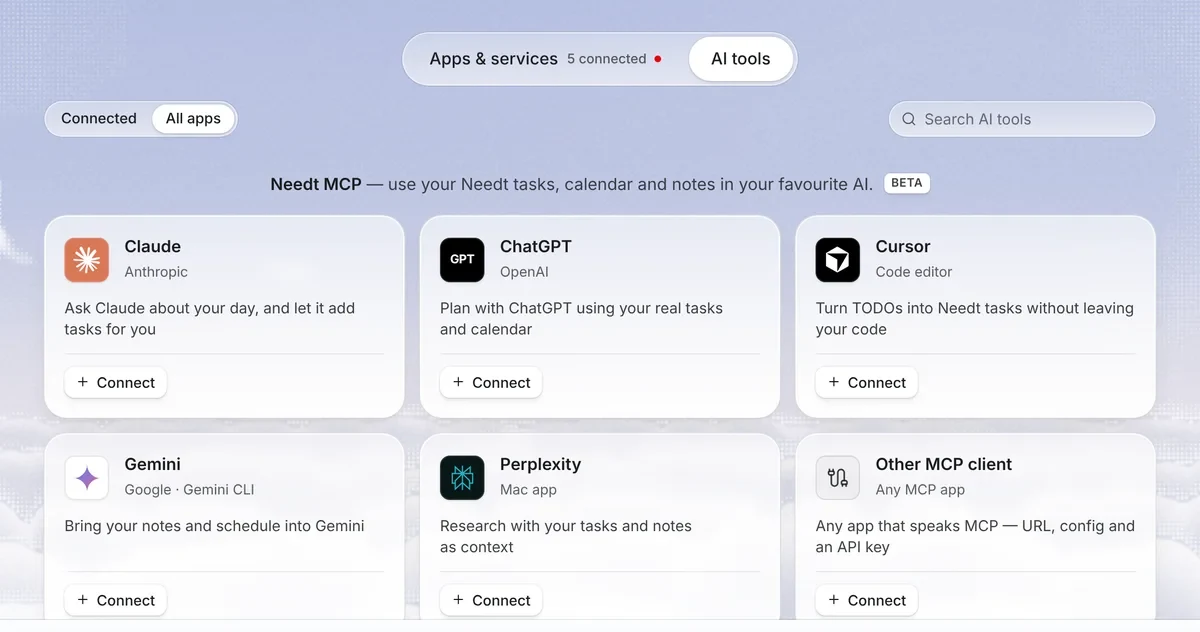
Everything starts in Connections → AI tools. Each client has a card; Connect shows the steps and the address to copy, and Check connection confirms it works.
What it can do
| Tool | What it does |
|---|---|
needt_create_task | Adds a task — title, notes, estimate, deadline, priority, energy, context — and lets the scheduler find it a slot. |
needt_list_tasks | Reads your tasks with their status, dates and projects. |
needt_schedule | Runs the scheduler over open tasks and returns the plan. |
needt_reschedule | Re-plans after something moved, and returns what changed. |
needt_control | Everything else: an overview of the workspace, projects, updating and completing tasks, calendars and events. |
Prompts to try
- “What’s overdue, and what can wait until next week?”
- “My 2 pm moved to 4. Re-plan the afternoon and tell me what moved.”
- “Add a 90-minute block for the Spanish homework before Thursday, low energy.”
- “Create a project called Launch with these six tasks, each with an estimate.”
- “Plan my week around three deep-work mornings.”
Safety
- Deleting asks twice. A delete only goes through when the assistant sends an explicit confirmation, and deleted items land in Needt’s trash, where you can restore them.
- Read freely, write deliberately. Most clients show each tool call before it runs. Keep confirmations on for anything that changes your plan.
- Revoke in one place. Settings → Data → Personal API lists every token and connected app. Removing one cuts it off immediately.
- Watch what you paste. An assistant follows text it reads. Don’t let it act on instructions that came from an email or a web page you didn’t write.
Troubleshooting
- 401 Unauthorized. The token is missing, mistyped or revoked, or the header lacks the
Bearerprefix. Create a fresh token and try again. - No tools show up. Remove the server, add it again, and make sure the address has no trailing path. Restart the client after editing a config file.
- The sign-in window doesn’t open. Allow pop-ups for the client, or use a token instead.
- Still stuck? Write to hello@needt.app with the client name and what it says.
Client steps checked against each vendor’s documentation on 11 October 2026. Menus in these apps change often.
