
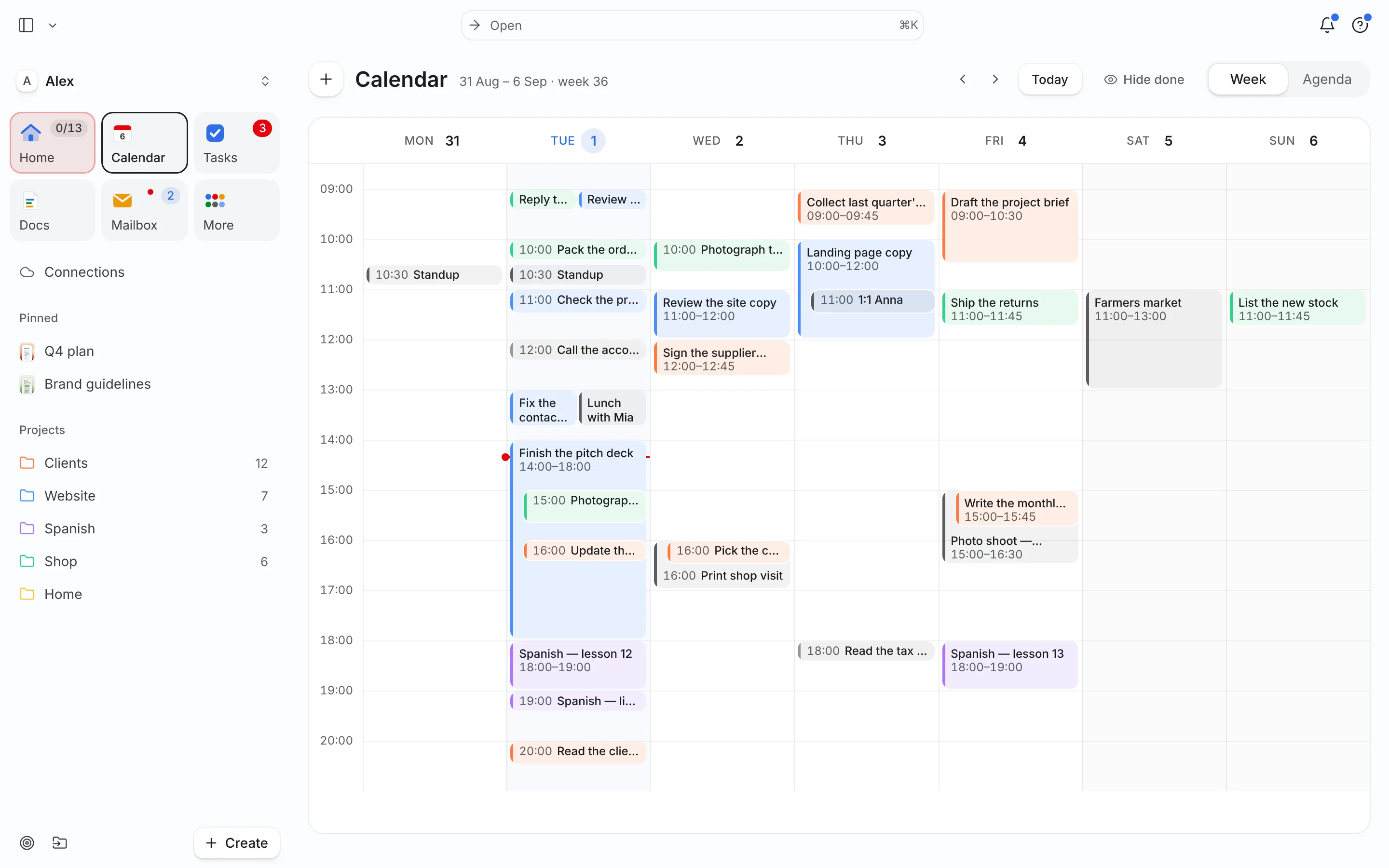
What time blocking is
A to-do list tells you what to do. A time-blocked day also tells you when. You split the day into blocks, say 09:00–10:30 for the client proposal and 10:30–11:00 for email, and you treat those blocks like meetings with yourself.
The method is old, but the clearest modern case for it comes from Cal Newport, who blocks out every hour of his workday in a notebook each morning and revises the plan when the day shifts. He argues that giving every minute a job beats running the day from a list, and his student case study shows why: a list hides how little time is left, a schedule doesn’t.
Time blocking is not the same as rigid scheduling. The plan will break. The point is that when it breaks, you can see exactly what got pushed and decide on purpose.
How to time block in seven steps
- Write down the fixed things first. Meetings, classes, school pickup, the gym. These are the walls of your day. If your calendar already holds them, you are done with this step.
- List today’s tasks with an estimate each. “Draft proposal — 90 min”, “Invoice two clients — 20 min”, “Spanish lesson — 30 min”. No estimate, no block.
- Add 25–50% to anything you have not done before. People reliably underestimate their own tasks; Buehler, Griffin and Ross called it the planning fallacy. A buffer is cheaper than a ruined afternoon. See planning fallacy.
- Put your hardest task in your best hours. For most people that is the first 2–3 hours of work. Protect one block of 90–120 minutes for it.
- Batch the small stuff. Email, messages and quick admin go into one or two 30-minute blocks, for example 11:30 and 16:30, instead of leaking all day.
- Leave 15–20% of the day open. One unplanned hour in an eight-hour day absorbs the call that runs long and the task you forgot.
- Re-block when the plan breaks. When something overruns, don’t abandon the plan. Take two minutes, move the remaining blocks, and decide what drops to tomorrow.
Worked example: Alex’s Tuesday
Alex is a freelance designer with three fixed events on Tuesday, October 13: a client call at 10:00, lunch with a friend at 12:30 and a dentist appointment at 16:00. Here is the open list and the blocked day.
| Time | Block | Why there |
|---|---|---|
| 08:30–09:45 | Website: homepage layout (75 min) | Hardest task, freshest hours |
| 09:45–10:00 | Buffer, prep call notes | Transition before a meeting |
| 10:00–10:45 | Client call (fixed) | — |
| 10:45–11:30 | Clients: revise logo per call feedback | Act while the call is fresh |
| 11:30–12:00 | Email + invoices (batched) | Small tasks in one block |
| 12:30–13:30 | Lunch (fixed) | — |
| 13:45–15:15 | Clients: brand guidelines draft | Second deep block |
| 15:15–15:45 | Shop: answer two orders, restock note | Low-energy admin |
| 16:00–17:00 | Dentist (fixed) | — |
| 17:15–17:45 | Spanish lesson | Light, after errands |
At 10:45 the call runs 25 minutes over. Alex shortens the logo revision to 20 minutes and moves the rest into the open 12:00–12:30 slot. Nothing is lost; one decision was made in the open instead of the whole afternoon quietly sliding.
Common mistakes
- Blocking 100% of the day. A plan with no slack fails at the first interruption. Keep at least an hour open.
- Letting blocks stretch. Parkinson’s law — work expands to fill the time available — cuts both ways. A 2-hour block for a 45-minute task invites 2 hours of fiddling. See Parkinson’s law.
- Blocks too small. Ten 15-minute blocks is a to-do list with timestamps. Most real work needs 45 minutes or more.
- No re-blocking. The first plan is a draft. Re-planning at lunch is part of the method, not a failure.
- Ignoring energy. Putting the hardest writing at 15:00 because that slot was free usually backfires.
Three ways to block
Not every day needs the same level of detail. Pick the style that matches how predictable your day is:
- Full blocking. Every working hour has a job. Best for days with few meetings and clear priorities, like a writing day.
- Anchor blocking. Only two or three big blocks are fixed (for example 08:30–10:30 deep work, 13:30–15:00 project work); the rest stays flexible. Best for mixed days.
- Reactive blocking. Most of the day is blocked as “support / inbox / calls”, with one protected block at the edge. Best for on-call or customer-facing days.
Most people switch between styles during the week. Plan the style when you plan your week, and pick the method for choosing what goes into the blocks with the Eisenhower matrix or the 1-3-5 list.
How to time block in Needt
Needt does the placement for you. You give tasks an estimate; it finds slots in your free time around meetings.
- Connect your calendar (Google, Outlook/Microsoft 365, iCloud or any CalDAV) so meetings become the fixed walls. See Google Calendar integration.
- Type tasks naturally:
homepage layout, 75 min, by Wednesday #Website, high energy. Estimate, deadline, project and energy are parsed for you. - Let Needt auto-schedule. Tasks land in open time, ordered by deadline, priority and energy. You see them next to your events in Calendar (day or week view) and on Home.
- When the day breaks, let it rebuild. If a meeting moves or a task runs over, Needt rebuilds the rest of the day and shows what moved. You confirm.
Or ask the agent in Ask:
Block 90 minutes for the brand guidelines before Thursday, and keep my mornings for Website work.
The call ran over. Re-plan my afternoon.
Prefer paper-style planning? Start with the free time-blocking schedule template or the daily planner. For the short morning routine that fits around this, read Plan your day in five minutes.
