
Why plan the week, not just the day
A day is too short to fit a 4-hour project around meetings. A week isn’t. Cal Newport plans his week every Monday morning and treats daily plans as the detail inside it (Plan your week in advance). Weekly planning answers the question daily planning can’t: when this week will the big thing happen?
If you haven’t cleared last week’s loose ends, do a weekly review first. Planning on top of a messy inbox just moves the mess.
The 15-minute plan, timed
- Minutes 0–3: Write three outcomes. Finished states, not activities. “Homepage v1 live”, not “work on website”.
- Minutes 3–5: Look at the fixed week. Open your calendar in week view. Count meeting hours. Note the day with the biggest open stretch.
- Minutes 5–9: List and estimate the tasks behind each outcome. Use 15, 30, 60, 90 or 120 minutes. Anything over 2 hours gets split.
- Minutes 9–13: Block the big rocks first. Put the largest task for each outcome into the longest open stretches. Smaller tasks fill in later, day by day.
- Minutes 13–15: Run a capacity check. Add up hours: meetings + blocked tasks. If it’s over 80% of your working hours, cut or move something now. The planning fallacy means your estimates are probably low already.
Worked example: Alex’s week (and Tuesday)
Sunday 19:00. Alex’s three outcomes: Homepage v1 live (Website), Logo project approved and invoiced (Clients), Two Spanish revision sessions (Spanish). Meetings this week: 9 hours. Working hours: 36. Plannable: about 29. Tasks estimated: 19.5 hours. Fits, with room.
| Day | Big rock blocked | Meetings |
|---|---|---|
| Mon | Website: homepage layout, 09:00–11:00 | 2 h |
| Tue | Clients: final logo files, 08:30–10:00; Website: homepage copy, 13:30–15:00 | 1.5 h |
| Wed | Spanish revision, 08:00–08:45 | 3.5 h |
| Thu | Website: build + test, 09:00–12:00 | 1 h |
| Fri | Spanish revision, 08:00–08:45; weekly review, 16:00 | 1 h |
On Tuesday the logo client asks for one more variation. Because only the big rocks were fixed, Alex moves “homepage copy” to Wednesday afternoon (which had space) and the week still lands. That is the point of slack.
For the morning routine that turns this into a concrete Tuesday, see Plan your day in five minutes.
Variation: theme your days
If you juggle several roles, give some days a theme. Theming cuts context switching because you stay in one kind of work longer. A simple pattern for Alex:
| Day | Theme | What goes there |
|---|---|---|
| Mon | Build | Website deep work, no calls before 12:00 |
| Tue | Clients | Client calls, revisions, invoices |
| Wed | Meetings | Calls batched; light admin between |
| Thu | Build | Website build + test |
| Fri | Shop + review | Shop orders, content, weekly review |
Themes are defaults, not rules. When a client can only meet Monday, take the call and keep the rest of the day on theme. Founders and freelancers often find this easier than hour-by-hour plans; see Needt for founders and for freelancers.
Sunday or Monday? Pick by trigger
Either works. What matters is that the plan happens at a fixed time and place, attached to something you already do. “After Sunday dinner, I plan the week at the kitchen table” is an if-then plan, the kind Gollwitzer’s research on implementation intentions links to better follow-through.
- Sunday evening suits people who sleep better with Monday already decided. Keep it to 15 minutes so it doesn’t eat the weekend.
- Monday morning suits people whose weekends are unpredictable, or whose Monday inbox changes priorities. Plan before you open email.
- Friday afternoon, right after a weekly review, is the most thorough option because last week is still fresh.
Whichever you choose, add it as a recurring 15-minute event so it survives busy weeks.
Common mistakes
- Planning every task for every day on Sunday. You’ll re-plan it all by Tuesday. Fix the big rocks; leave the rest flexible.
- Outcomes that are activities. “Work on Shop” can’t be finished. “Autumn product list published” can.
- No capacity check. The most common reason a week fails is that it never fit.
- Ignoring the meeting-heavy day. Don’t block deep work on the day with 3.5 hours of calls.
- Planning too late on Sunday. Tired planning is optimistic planning.
How to do it in Needt
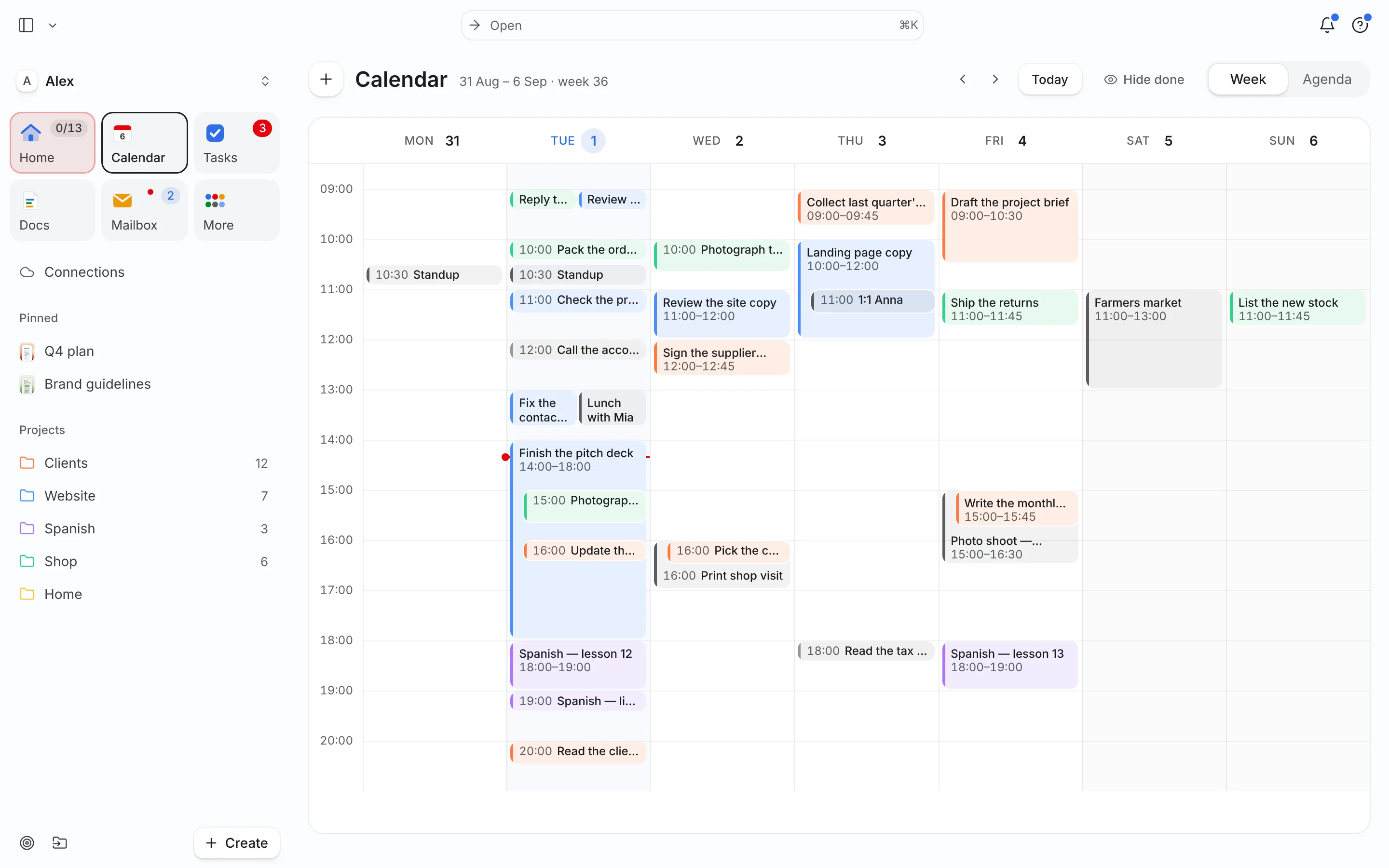
- Open Calendar in week view with your calendars connected. Meetings are already there.
- Add tasks in one go, one per line:
homepage layout, 120 min, by Monday #Website, high. - Auto-schedule the week. Tasks land in free time by deadline, priority and energy. Scheduled tasks show next to your events.
- Adjust, don’t rebuild. Drag the one or two blocks you’d place differently. When the week shifts, Needt rebuilds and shows what moved.
Ask prompts for the capacity check:
How many hours of meetings and scheduled tasks do I have this week? Is anything over capacity?
Plan my week: Website first, Clients second, keep Wednesday afternoon free.
Want paper first? Use the weekly planner template or try the Eisenhower matrix to pick the three outcomes.
